Timber Chopper Arcade Game
Reviews
Timber Man Wood Chopper is a clean arcade game that is easy to pick up. The core mechanic of chopping wood while avoiding branches is straightforward. As the speed ramps up, it becomes a true test of reflexes. The pixel art style is charming and the game runs smoothly. It offers good replayability for short sessions. A solid choice for casual players looking for a quick challenge.
Description
Game Introduction
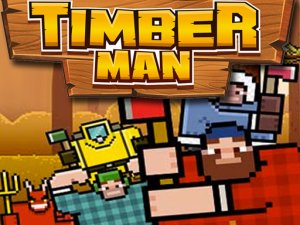
Timber Chopper Arcade Game is a fast-paced action clicker where you control a cute 2D character tasked with chopping wood. The core objective is to survive as long as possible by timing your swings to avoid hitting branches on the tree trunk. With its charming pixel art style and addictive mechanics, this game offers a simple yet challenging experience that tests your reflexes and concentration. It is perfect for players of all ages who enjoy quick, engaging gameplay sessions.
How to Play
In Timber Chopper Arcade Game, you stand in the middle of a tree trunk with branches on both sides. To play, simply tap or click on the left or right side of the screen to swing your axe to that side. The key is to only chop the parts of the trunk without branches. Each successful chop adds to your score, while hitting a branch ends the game. As you progress, the speed increases, making it harder to time your swings. The game is easy to learn but requires practice to master.
Game Features
This arcade game features simple one-tap controls that anyone can learn quickly. It offers endless replayability with a high score challenge that encourages you to beat your personal best. The cute 2D character and charming pixel art style create a visually appealing experience. The difficulty increases as you chop more wood, providing a growing challenge. It is suitable for players of all ages and is great for quick breaks.
Tips for Success
To succeed in Timber Chopper Arcade Game, focus on staying calm and maintaining a steady rhythm. Practice regularly to improve your timing and reflexes. Pay close attention to the pattern of branches and anticipate the next swing. Avoid rushing your taps; it is better to wait for a clear opening than to hit a branch. Taking short breaks can help you stay sharp and avoid fatigue during longer sessions.
✅ Compatibility & Testing
Faq
Is Timber Chopper Arcade Game free to play?
Can I play this game offline?
What platforms is Timber Chopper available on?
Does the game have a leaderboard?
Are there different characters or skins to unlock?
How can I save my progress in the game?
Similar Games

Cave-Woman Escape Puzzle

Kick The Pirate Fun Stress Relief

Beagle Dog Escape Puzzle

Amgel Easy Room Escape 45 Puzzle Game

Tricky Village Escape Puzzle

Purrfect Clicker Idle Cat Game
Naughty Cat Hidden Object Puzzle

Tom and Jerry Clicker Arcade

Rooster Hen Escape Puzzle

Thanksgiving Escape Puzzle

Rescue The Puppy Puzzle

Duck Family Rescue Puzzle

Little Fingers Stealth Arcade

Cemetery Escape Puzzle Adventure

SuperStar Dressup Fashion Game