Cue Master: Table Sports Arena
Sports Table Game Arcade Family

Cue Master: Table Sports Arena

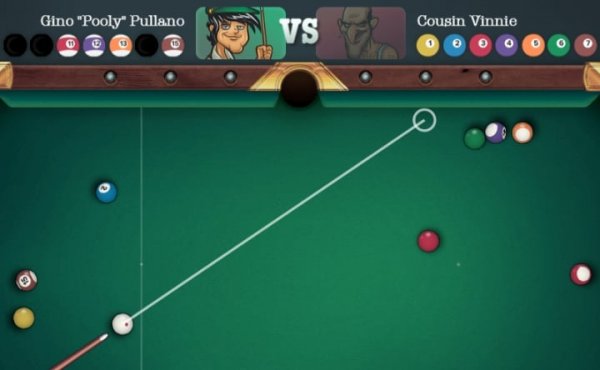
Cue Master: Table Sports Arena delivers a satisfying billiard experience without unnecessary extras. The shot mechanics feel precise, and the aiming guide helps newcomers while still allowing experienced players to finesse their technique. Opponents introduce varied objectives that keep each match interesting, and the difficulty ramps up at a comfortable pace. The browser-based design means zero setup time, and the graphics are clear without being flashy. For anyone looking for a straightforward, family-friendly pool game that respects their time, this is a strong choice.

๐ŸŽฎ
Developer Flame Reckoners
โญ
Rating
Advertisement
Game Player

Match Structure & Opponents

Each session in Cue Master: Table Sports Arena places you at a regulation-style table against a new challenger. The game introduces a sequence of opponents, and each one brings a slightly different objective to complete. Early matches focus on fundamental shot-making, while later encounters demand careful positioning and planned sequences. This structure keeps the experience fresh without overwhelming new players. The difficulty curve feels natural, allowing players to build confidence before facing tougher scenarios.

Shot Mechanics & Controls

Controlling the cue stick is straightforward. On a desktop, the mouse handles aiming and power adjustment. Dragging backward sets the force of the strike, and releasing sends the cue ball forward. A visible aiming guide appears to help line up shots, which is especially useful for angled pockets or when trying to leave the cue ball in a favorable spot. Touch controls on mobile devices mirror this system, making the transition between platforms seamless. The physics engine produces realistic ball movement, with spin and speed affecting trajectory.

Visual Presentation & Performance

The game uses clean, clear graphics that emphasize the table and balls without unnecessary clutter. The felt texture, rail cushions, and pocket openings are rendered with enough detail to feel authentic but remain optimized for browser play. Animations are smooth, and the interface stays responsive even on older devices. There are no distracting backgrounds or intrusive menus. The focus stays on the table, which helps players concentrate on their shots. The overall visual style is bright and accessible, suitable for a family audience.

Strategic Depth & Skill Development

While the basic controls are easy to learn, mastering the game requires thoughtful planning. Each opponent may require specific tasks, such as pocketing balls in a particular order or using the cue ball to set up the next shot. This pushes players to think beyond simply sinking balls. Understanding how English, speed, and angle affect the cue ball's path becomes important as the difficulty increases. Regular practice helps players recognize patterns and develop consistent technique. The game rewards patience and careful observation over fast reflexes.

Accessibility & Platform Support

Cue Master: Table Sports Arena runs entirely in a web browser, so no downloads or installations are needed. It works on both desktop computers and mobile devices, with controls that adapt to each screen size. The interface is designed to be intuitive, with clear indicators for power and aim. Loading times are short, and the game resumes quickly after each match. This makes it easy to play a few rounds during a break or settle in for a longer session. The family-friendly design means players of all ages can enjoy it without concern.
Compatibility

๐Ÿ’ป Desktop | ๐Ÿ“ฑ Mobile | ๐Ÿ“Ÿ Tablet
โ€“ All supported ยท Best with Chrome or Safari
Does Cue Master: Table Sports Arena require any payment to play?
No, the game is completely free to play in your browser. There are no paywalls or hidden fees. All opponents and table features are accessible without any purchase. The game generates no revenue from players directly, so you can enjoy unlimited sessions.
Can I play Cue Master on a tablet or smartphone?
Yes, the game is fully optimized for touch screens. On tablets and smartphones, you control the cue by dragging on the screen to aim and set power. The interface adjusts to fit smaller displays, and the aiming guide remains visible. Performance is smooth on most modern mobile browsers.
What happens if I lose a match against an opponent?
Losing a match does not end the game. You can retry the same opponent as many times as you like. The game encourages learning from each attempt. Each loss provides feedback on your shot choices, helping you adjust your strategy for the next try.
Are there different table styles or environments in the game?
The game focuses on a single, well-designed table layout to keep the experience consistent. The table features standard markings and pocket sizes. While there are no alternate environments, the clean visual style ensures that distractions are minimized, allowing you to concentrate on your shots.
Is there a multiplayer mode where I can challenge friends?
Cue Master: Table Sports Arena is designed as a single-player experience where you face a series of AI-controlled opponents. There is no direct multiplayer or online matchmaking. The challenge comes from progressing through the opponent list and improving your personal performance.
How do I improve my accuracy with the aiming guide?
The aiming guide shows a projected path for the cue ball. To improve accuracy, practice adjusting the angle and power while observing how the guide changes. Focus on aligning the guide with your intended target. Over time, you will develop a feel for how much power to apply for different distances.

Player Comments

0 comments
U
User
Loading comments...

Share this page

Copy the link below and share it with your friends!